

Table of Contents
- Xero Payroll vs Standalone: The Quick Answer
- What Is Xero Payroll and How Does It Work?
- What Is Standalone Payroll Software?
- Xero Payroll: Pros and Cons
- Standalone Payroll Software: Pros and Cons
- Head-to-Head Comparison
- Which Payroll Setup Suits Your Business?
- How to Compare the Real Cost
- Australian Payroll Compliance: What Still Needs Checking
- Payroll Considerations for Sunshine Coast Businesses
- How KBAS Can Help
- Frequently Asked Questions
Key takeaways
- Xero Payroll is a practical starting point when you already use Xero and your pay runs are straightforward.
- Specialist payroll software can offer stronger award interpretation and workforce management, depending on the product and plan.
- You can keep Xero for accounting while using another platform for payroll.
- A third option is to connect a rostering or award interpretation app to Xero Payroll.
- Compare the full cost, including setup, integrations and the time spent checking each pay run.
- Neither option removes your responsibility to pay staff correctly and meet reporting and super obligations.
You already use Xero for your accounts. Now you are wondering if Xero Payroll will handle your team, or a separate payroll system would make life easier.
Perhaps your pay runs barely change. Perhaps every week brings different shifts, allowances and overtime, followed by another spreadsheet to work out who should receive what. Those are two very different payroll jobs.
For Australian small businesses, the right choice depends on how people work, the rules that apply to their pay and how information reaches your accounts. Here is how to compare the options without paying for features you do not need or overlooking the ones you do.
Xero Payroll vs Standalone: The Quick Answer
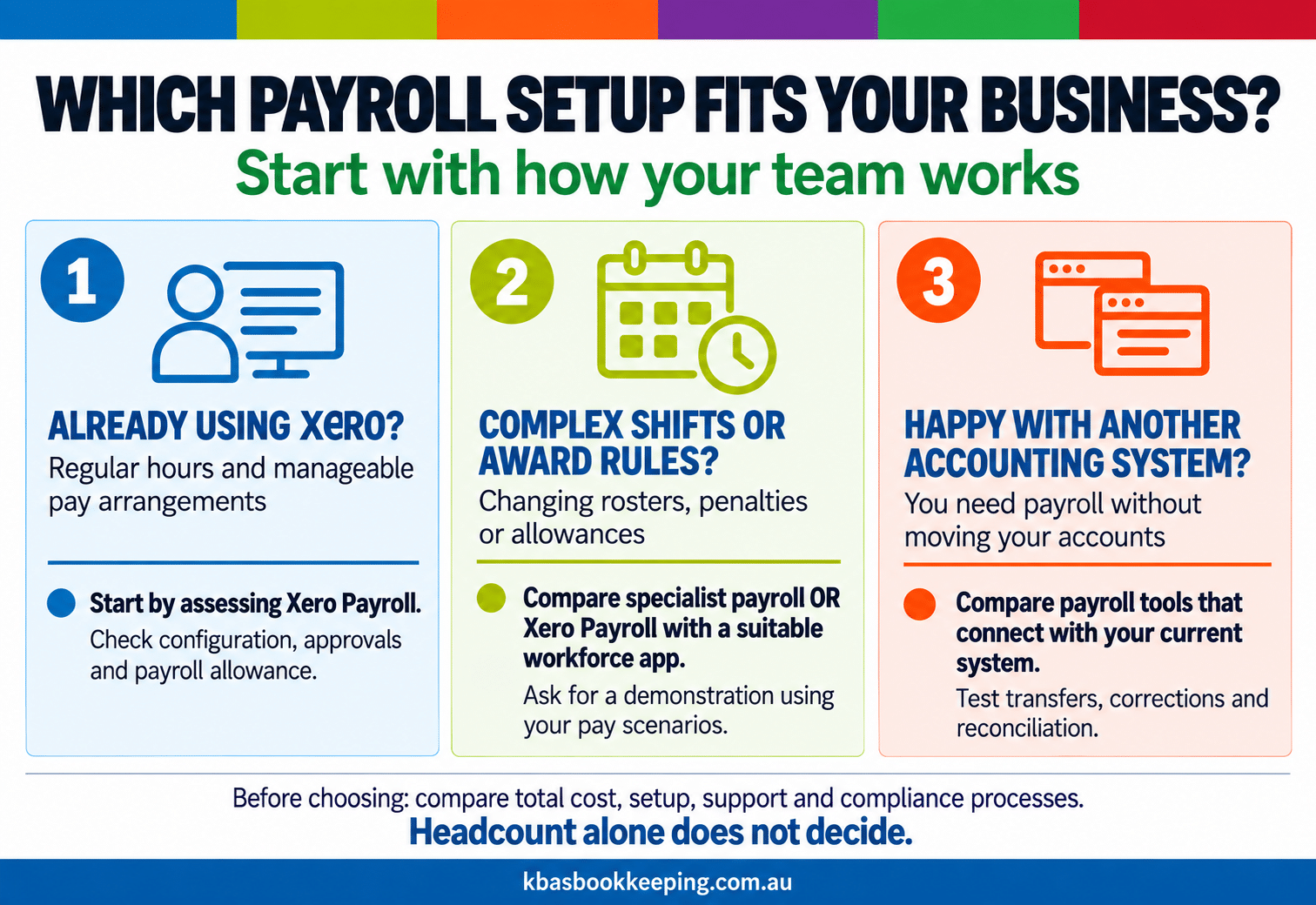
Already using Xero with manageable payroll requirements? Start by assessing Xero Payroll. Spending hours interpreting shifts and checking pay rules? Compare specialist tools.
| Your situation | A sensible starting point |
|---|---|
| Xero accounts, regular hours and straightforward pay runs | Xero Payroll |
| Changing rosters, layered penalties or several awards | Specialist payroll with suitable award functionality |
| Happy with your accounting software elsewhere | A payroll tool that connects with your existing system |
| Xero Payroll works, but preparing timesheets is painful | Xero Payroll plus a compatible workforce app |
Our Xero, MYOB and QuickBooks comparison covers the broader accounting decision. Here, the focus is whether your payroll process needs something more.
What Is Xero Payroll and How Does It Work?
Xero Payroll sits within Xero’s Australian accounting plans. It supports pay calculations, PAYG withholding, leave, payslips and Single Touch Payroll reporting. Employees can use Xero Me for tasks such as viewing payslips, submitting timesheets and requesting leave.
Payroll information connects with your accounting records, reducing separate data entry. Super payment features are also available, with setup and payment arrangements to confirm.
The old Payroll Only plan is no longer sold. Xero’s 2024 plan announcement confirms that sales stopped on 1 July 2024, with existing customers moving through a later transition. New customers should compare the current accounting plans rather than rely on old payroll-only reviews.
What Is Included at Each Plan Level?
For smaller employers, these are useful reference points from Xero’s Australian pricing pages, checked in September 2026:
| Plan | Included payroll allowance |
|---|---|
| Ignite | 1 person |
| Grow | 2 people |
| Comprehensive | 5 people |
| Ultimate 10 | 10 people |
Check Xero’s current plans and simpler-business plans for current allowances, larger options and additional charges. Your accounting requirements also affect which plan makes sense.
What Is Standalone Payroll Software?
Standalone Payroll Software operates separately from your accounting platform. It can exchange payroll information with your accounts through a direct connection, file export or accounting journal.
Examples include Employment Hero Payroll, Payroller and CloudPayroll. These are not interchangeable products. Some prioritise straightforward pay runs; others offer broader workforce tools, award rules or reporting. Features can also differ between subscription levels.
“Standalone” describes the relationship with your accounting system. It does not automatically mean cheaper, more powerful or easier to use.
Xero Payroll: Pros and Cons
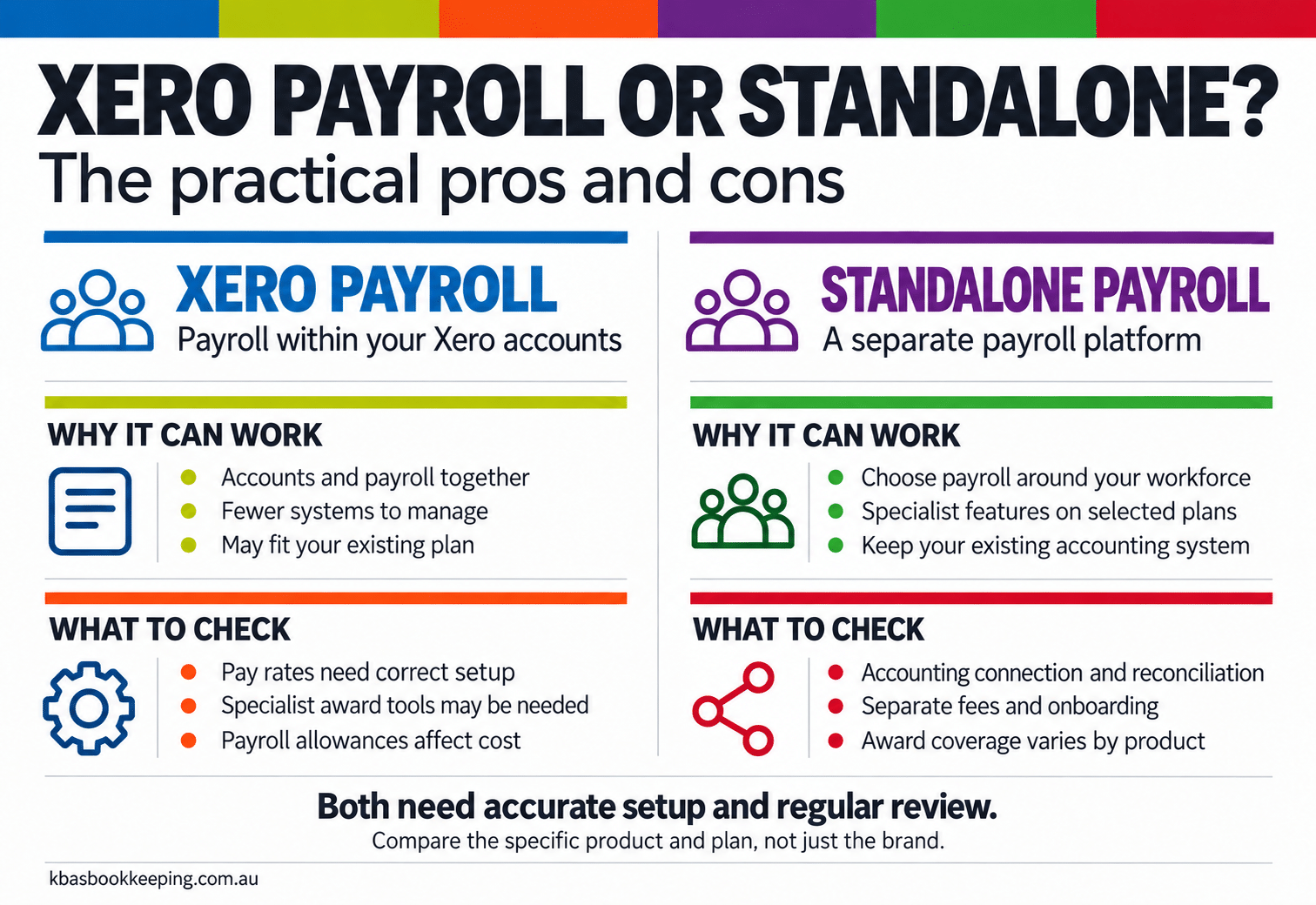
Pros of Xero Payroll
1. Your accounts and payroll work together. Payroll costs and liabilities feed into the same accounting environment. There is less need to move information between separate systems, although bank payments and payroll balances still need reconciling.
2. Fewer systems to manage. If you already use Xero, keeping payroll there can simplify access, training and day-to-day administration. Your bookkeeper can review payroll alongside the rest of your records.
3. Useful employee self-service. Giving staff access to payslips and leave information can reduce routine requests to the office. Timesheet and leave approvals still need a clear process.
4. It may make good use of a subscription you already need. When your accounting plan includes enough payroll capacity, a separate product may add cost without solving a meaningful problem.
Cons of Xero Payroll
1. Award interpretation needs particular attention. Xero can calculate using the pay items and rates you configure. That is different from automatically interpreting an award, assigning the correct classification and maintaining every applicable rate.
In its response about automated award wages, Xero directs users towards third-party apps for embedded award functionality. Do not assume entering someone’s hours will automatically identify every penalty or allowance.
2. Complex workforce processes may need another app. If managers build changing rosters, approve shifts and allocate time across jobs, assess that whole process. Basic timesheet functionality may not cover everything you need.
3. Bundled pricing can be less attractive for payroll-only needs. If you are happy with another accounting platform, a Xero subscription solely to run payroll needs a clear financial justification.
4. Growing payroll can change the cost. Recheck the applicable plan and charges as your team changes. A subscription that fitted last year may not be the best fit now.
“Your payroll can calculate perfectly from the wrong pay rate.”
Standalone Payroll Software: Pros and Cons
Pros of Standalone Payroll Software
1. You can choose payroll separately from accounting. Keep the accounts where they work well and select payroll around your workforce. Confirm the connection with your particular accounting product before subscribing.
2. Specialist award tools can reduce manual checking. For example, Employment Hero’s award interpretation features support calculations based on pay rules, including overtime and allowances. Verify that the product supports your actual award or agreement and employment arrangements.
3. It can suit a business that only needs payroll. A focused product may offer better value than buying an accounting package you will barely use. Compare ongoing fees, employee charges and required features.
4. There may be more room for operational complexity. Depending on the platform, approvals, workforce reporting and location-based processes can be managed in greater detail. Buy that capability when it addresses a real need.
Cons of Standalone Payroll Software
1. The accounting connection needs care. Wages, tax and super must reach the correct accounts. Check how corrections are handled and who investigates failed transfers.
2. Another subscription brings another cost. Add onboarding, support, integrations and any separate rostering or HR modules. A low headline fee may not represent the setup you need.
3. Setup can take more work. Award rules still need the correct classifications, employment details and approvals. Automating an incorrect configuration can repeat the same mistake across the team.
4. More functionality can mean more administration. Someone must maintain access, review updates and train the people approving payroll. A simpler business may gain little from an elaborate system.
Standalone does not necessarily mean manual transfers. Employment Hero documents automatic payroll journal posting to Xero after configuration. The integration quality matters more than whether there are one or two products.
Head-to-Head Comparison
| Feature | Xero Payroll | Standalone payroll software |
|---|---|---|
| Accounting connection | Within Xero | Integration or export; varies by product |
| STP reporting | Supported | Confirm current Australian STP support |
| Super payments | Available; configure the workflow | Check payment service, approvals and timing |
| Award interpretation | Configured pay items; specialist apps may be needed | Available in some products and plans |
| Rostering and timesheets | Timesheets; assess apps for broader rostering needs | Capabilities vary from basic to extensive |
| Employee self-service | Xero Me | Check the employee app or portal |
| Cost structure | Accounting subscription and payroll allowance | Separate fees, often influenced by headcount or modules |
| Strongest fit | Xero users with manageable payroll processes | Businesses needing payroll independence or specialist features |
Neither column wins every row. Choose the combination that reduces the work and errors in your particular business.
Which Payroll Setup Suits Your Business?
You Already Use Xero and Your Payroll Is Straightforward
Consider a professional services business with six employees working regular hours. If the pay arrangements are correctly configured and leave is easy to manage, Xero Payroll may be entirely adequate.
Before changing, identify the problem. Unapproved timesheets or incorrect pay templates might require a better process rather than different software.
You Have Complex Awards, Shifts or Pay Rates
Consider a cafe with casual staff, weekend shifts and changing rosters. The difficult part may be determining the correct pay for each shift before payroll is processed.
A specialist platform could help. Ask the provider to demonstrate your actual scenarios, including overtime, allowances and public holidays, using anonymised examples.
There is also a middle path. The Xero App Store’s payroll and HR category includes tools that can support workforce processes around Xero. You may be able to improve roster-to-payroll preparation without replacing payroll itself.
You Use Another Accounting Platform
Start with products that fit your existing accounts. Changing accounting systems just to access payroll can create a much larger project than the original problem warrants.
Ask for a demonstration of the entire connection, including a corrected pay run. Seeing a journal arrive is useful; seeing it arrive accurately after a change is better.
How to Compare the Real Cost
Compare two complete setups over a normal year. Include:
- Ongoing subscriptions after any introductory offer.
- Charges for your expected employee numbers.
- Rostering, award tools and accounting integrations.
- Migration, training and support.
- Time spent preparing, checking and reconciling payroll.
Before moving, confirm who will check leave balances, employee records and year-to-date payroll figures. Agree how STP reporting will transition so amounts are neither duplicated nor omitted. Keep access to the records you must retain.
Australian Payroll Compliance: What Still Needs Checking
Software supports compliance. It does not take over the employer’s obligations.
STP Reporting
The ATO’s STP reporting rules generally require reporting on or before payday, subject to applicable concessions or exemptions. Check submission status and resolve errors. A completed pay run is not sufficient evidence that reporting succeeded.
Payday Super
Payday Super commenced on 1 July 2026. Contributions generally need to reach employees’ super funds within seven business days after payday, with exceptions for specific circumstances. Follow the ATO’s Payday Super guidance.
Check authorisation, available funds, processing times and rejected payments. Calculating super in payroll is not the same as the employee’s fund receiving it.
Pay Rates, Payslips and Records
Review award coverage, classifications and entitlements whenever relevant circumstances change. Under Fair Work requirements, payslips must be provided within one working day of payday, and time and wages records must be kept for seven years.
Incorrect rates can mean back pay. Late super can create additional liabilities. These are reasons to maintain checks, even when a system appears to run smoothly.
Our payroll compliance checklist explains recurring reviews. For the connection between wages, withholding and activity statements, see how to read your BAS statement.
Payroll Considerations for Sunshine Coast Businesses
A Maroochydore office, a Caloundra cafe and a trades business working across the Sunshine Coast can have similar employee numbers but very different payroll requirements.
For hospitality, test weekends and public holiday shifts. For trades, check how job hours and allowances reach payroll. For a clinic, examine different employment arrangements and who approves changing hours.
These are illustrative examples, not client case studies. The useful question is the same: where does your team currently spend time checking, correcting or re-entering information?
“Choose payroll around the work your people do, not just the number of people you employ.”
How KBAS Can Help
Xero Payroll is worth considering when your accounts already sit in Xero and the payroll process is manageable. Standalone software deserves a closer look when specialist features or accounting independence matter more.
Sometimes the best improvement is better configuration, clearer approvals or a connected app.
KBAS provides software support and training alongside bookkeeping and payroll support. We can help you assess the process, the connection to your accounts and the practical work involved.
Not sure which setup suits your business? Talk to KBAS about bookkeeping and payroll support.
Frequently Asked Questions
Q: Is Xero Payroll Still Available as a Standalone Product in Australia?
A: The old Payroll Only plan is no longer sold. New customers access payroll through Xero’s current Australian accounting plans. Check the included payroll allowance when choosing a subscription.
Q: How Much Does Xero Payroll Cost in Australia?
A: The cost depends on your accounting plan and payroll usage. Check current pricing, included employee allowances and additional charges. If you already pay for Xero, compare the extra cost of your payroll needs rather than treating the entire subscription as a new expense.
Q: Does Xero Payroll Handle Modern Awards Automatically?
A: Do not assume it interprets your award or automatically updates every rate. Pay items and rates need correct configuration. Specialist connected apps can provide additional award functionality; check coverage against your specific employment arrangements.
Q: Does Xero Support STP Phase 2?
A: Yes. Xero supports STP Phase 2 reporting. Correct employee information, payment categories and successful submissions still matter. STP capability does not itself confirm that every wage or entitlement is correct.
Q: Can I Use Standalone Payroll With Xero Accounts?
A: Yes, where the payroll product offers a suitable connection or export. Confirm what transfers, how accounts are mapped and how corrections are processed. Employee information and leave balances may not transfer in the same way as payroll journals.
Q: Is Employment Hero Payroll Better Than Xero Payroll?
A: It may suit businesses needing its award and workforce features. Xero may be simpler for businesses already using it with manageable pay arrangements. Compare the relevant plans using your own pay scenarios before deciding.
Q: Do I Still Need Payroll Support if the Software Automates Calculations?
A: You still need someone competent to check the setup and review exceptions. A bookkeeper or registered BAS agent can assist within their expertise and service scope. Complex award or employment questions may need specialist advice, and employer responsibilities remain with the business.