

Which Cloud Accounting Software Is Right for Your Business?
Table of Contents
- Xero vs MYOB vs QuickBooks: The Quick Answer
- What Is Cloud Accounting Software and Why Does It Matter?
- Xero vs MYOB vs QuickBooks at a Glance
- Key Benefits of Choosing the Right Accounting Software
- Which Accounting Platform Is Best for Your Business?
- How Xero, MYOB and QuickBooks Compare on Everyday Tasks
- Australian Payroll, STP and Payday Super
- Inventory and Integrations Can Change the Winner
- How to Choose the Best Accounting Software in Five Steps
- Sunshine Coast Business Considerations
- The Bottom Line
- Frequently Asked Questions
Key takeaways
- Xero is our overall pick for most growing Australian small businesses, particularly businesses that value easy collaboration, strong integrations, streamlined bank reconciliation and an accounting system that can grow with them.
- MYOB remains a strong choice for established MYOB users and businesses with more involved inventory requirements, particularly those already using AccountRight.
- QuickBooks can represent good value for straightforward small businesses, with competitive subscription pricing and optional payroll functionality.
- All three can support Australian GST, BAS and payroll requirements when the correct product and configuration are used.
- Since Payday Super commenced on 1 July 2026, employers need to pay super with each pay cycle and generally have contributions reach employees’ funds within seven business days. You can read more about the changes through the Australian Taxation Office’s Payday Super information.
- The cheapest subscription is not necessarily the cheapest system to run. Payroll fees, integrations, inventory, data entry and the time your team spends fixing mistakes all matter.
- If your existing software is working well, your records are accurate and your systems are efficient, changing platforms simply for the sake of changing usually makes little sense.
You open one tab for Xero, another for MYOB and another for QuickBooks.
Before long, you are comparing subscription prices, payroll limits, apps, bank feeds and features you are not even sure you need. Sound familiar?
Choosing accounting software should make running your business easier. Yet choosing the wrong platform can leave you paying for unnecessary features, relying on workarounds or discovering that the software does not fit your payroll, reporting or operational systems after you have already moved everything across.
For Australian businesses, there is another important consideration: compliance.
Your accounting software sits behind your GST reporting, BAS, payroll, Single Touch Payroll and Payday Super processes. That does not mean the software makes every decision for you, but it does mean the setup matters.
So, when it comes to Xero vs MYOB vs QuickBooks Australia, which one should you choose? Here is how we look at it from the bookkeeper’s chair.
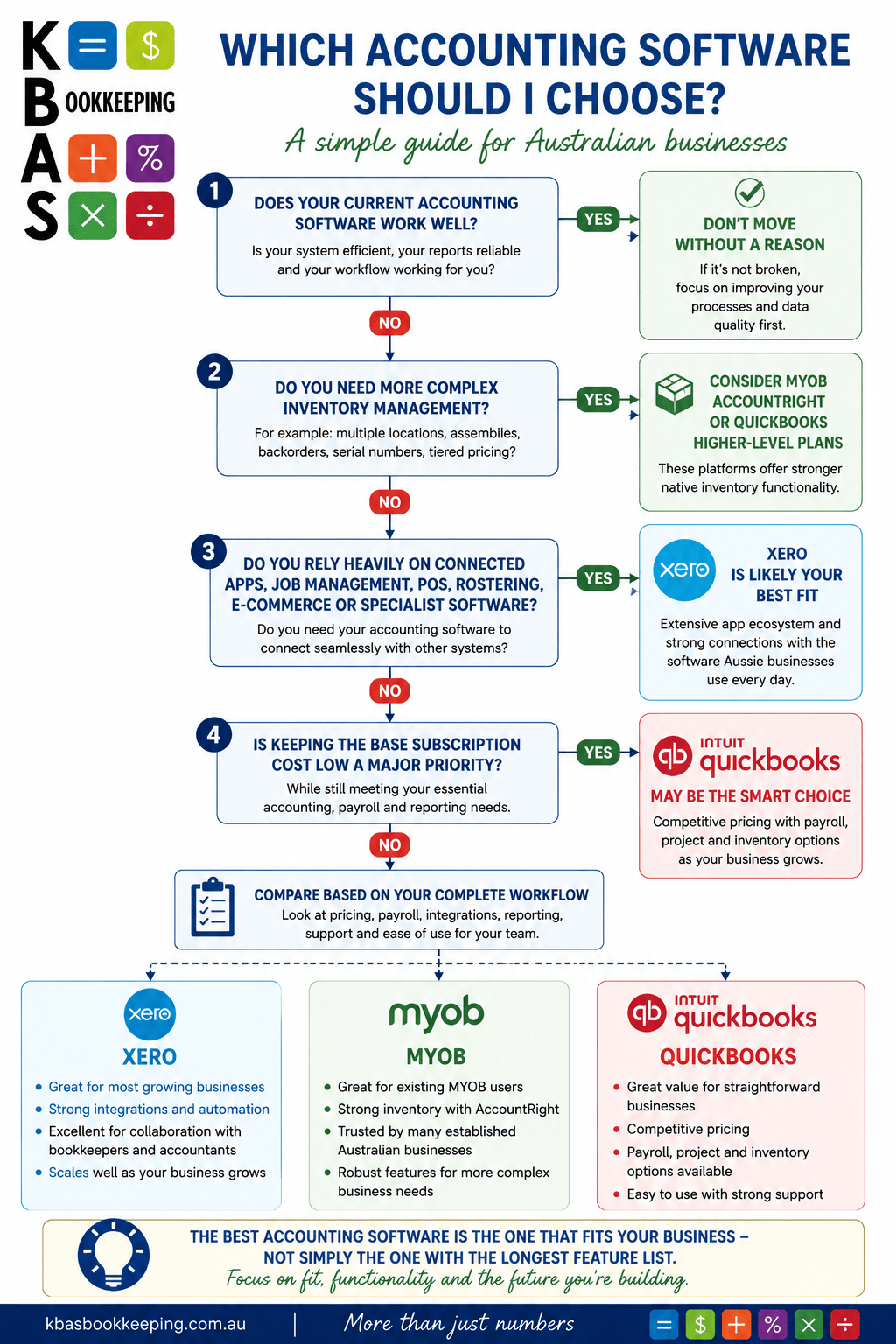
Xero vs MYOB vs QuickBooks: The Quick Answer
If you want the short version, this is where we would start:
| Your Business | Our Starting Recommendation |
|---|---|
| Growing service business with staff | Xero |
| Trades or construction business using connected job-management software | Xero |
| Professional services business wanting easy adviser collaboration | Xero |
| Hospitality or retail business using POS and other connected apps | Xero, subject to your POS and inventory requirements |
| Existing MYOB business with a well-functioning setup | Stay with MYOB unless there is a clear reason to move |
| Business needing more complex native inventory | Consider MYOB AccountRight or QuickBooks Plus/Advanced |
| Straightforward small business prioritising lower base subscription costs | QuickBooks is worth comparing |
| Business with messy accounts on any platform | Fix the bookkeeping before blaming the software |
KBAS has been open about its own preference.
Our software support and training service explains that, after comparing accounting platforms and drawing on extensive experience with MYOB, KBAS chose Xero for its usability, connectivity and ongoing development.
But there is an important second part to that position.
Xero is not right for every business, and we do not believe an existing client should be forced to change software simply because their bookkeeper prefers another platform.
That is the approach we are taking here too.
“Fix the bookkeeping before blaming the software.”
What Is Cloud Accounting Software and Why Does It Matter?
Cloud accounting software stores and processes your accounting information online rather than tying the whole system to one computer.
For a small business, that means your owner, internal staff, bookkeeper and accountant can work from the same current information without emailing backups backwards and forwards.
The three platforms in this comparison all cover core accounting tasks including:
- Invoicing and quotes
- Expense and bill tracking
- Bank feeds and reconciliation
- Financial reports
- GST tracking
- BAS preparation or lodgement functionality
- Connections with external business apps
Payroll, inventory, project tracking and advanced reporting depend on the platform and subscription level. The bigger question is not: “Can this software create an invoice?”
All three can.
The better question is: “How well does the software fit the way your business actually operates?” The wrong system can create double handling.
The right one can connect your sales, payroll, payments and bookkeeping so information flows with less manual work.
“The wrong system can create double handling.”
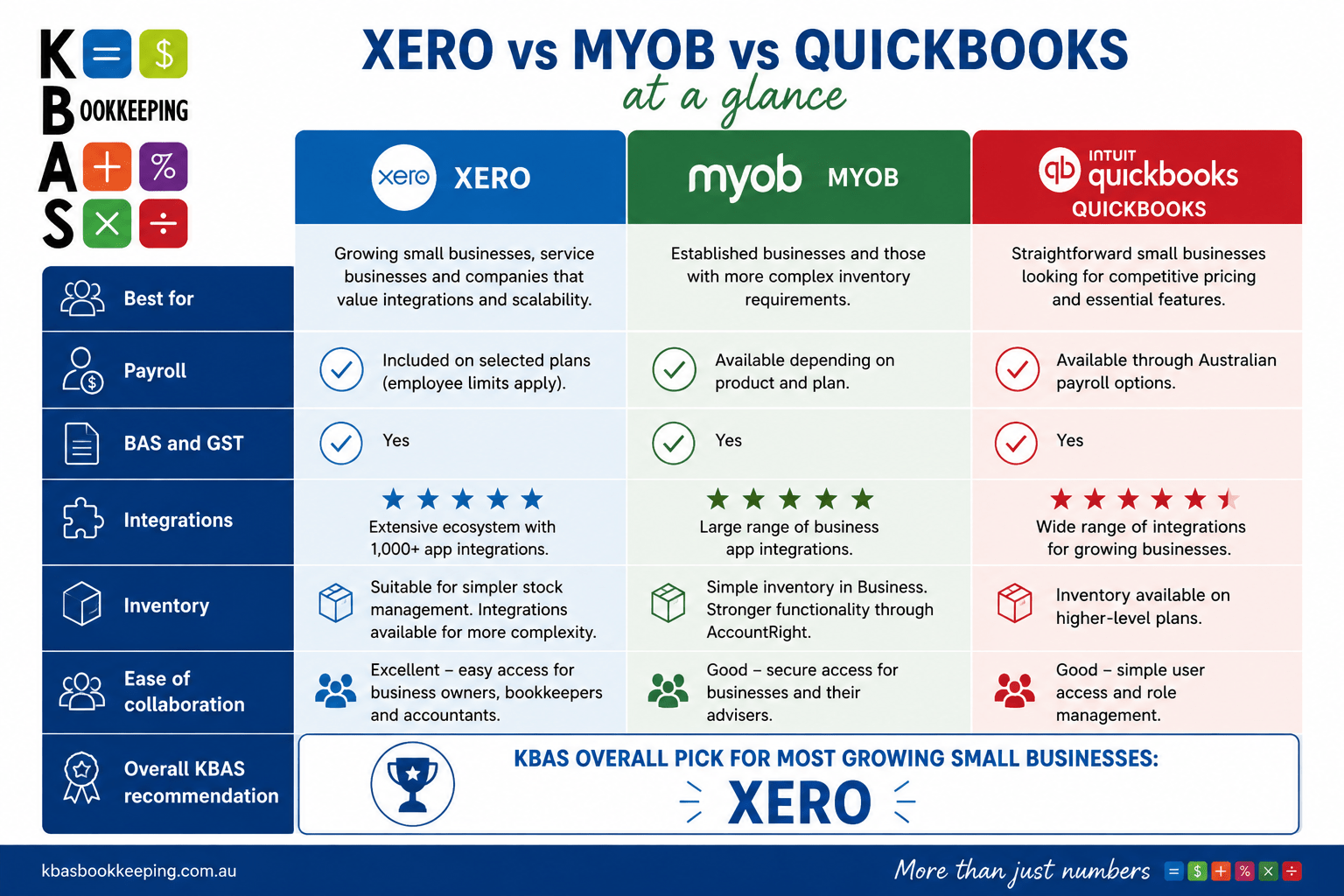
Xero vs MYOB vs QuickBooks at a Glance
Pricing changes regularly, so always check the current vendor pricing before making a decision.
| Feature | Xero | MYOB | QuickBooks Online |
|---|---|---|---|
| Best overall fit | Growing small businesses | Existing MYOB users and inventory-heavy businesses | Cost-conscious and straightforward businesses |
| Payroll | Included on selected plans, with employee limits depending on plan | Available depending on product and plan | Available through Australian payroll options |
| GST/BAS | Yes | Yes | Yes |
| STP | Yes with payroll | Yes with payroll | Yes with payroll |
| Payday Super support | Yes | Yes | Yes |
| App ecosystem | Extensive | Extensive | Extensive |
| Inventory | Suitable for simpler stock; integrations available for greater complexity | Simple inventory in Business; stronger functionality through AccountRight | Inventory available on higher-level plans |
| Multi-currency | Available on selected plans | Available in relevant products | Available on selected plans |
| Adviser collaboration | Strong | Strong | Strong |
You can check the latest plans directly through Xero Australia, MYOB Australia and QuickBooks Australia. Promotional discounts can make the first few months look dramatically cheaper. We recommend comparing the normal ongoing price, not simply the introductory offer.
Key Benefits of Choosing the Right Accounting Software
Good accounting software should do more than record what happened last month. When your system suits your business, it can help you:
- Reduce repetitive administration. Bank feeds, rules, recurring invoices and integrations reduce the amount of information that needs to be entered manually.
- Improve financial visibility. Up-to-date bookkeeping means reports are more useful when you are making decisions, rather than three months later.
- Make BAS preparation cleaner. Correctly reconciled accounts and properly configured GST codes give your bookkeeper a much stronger starting point.
- Simplify payroll compliance. Integrated payroll can bring wages, PAYG withholding, STP and super information into the same workflow.
- Scale more easily. Good integrations allow you to add job management, POS, rostering, inventory, ecommerce or reporting tools as your business becomes more complex.
As we explain in our guide to reading your BAS statement, software can populate the figures, but it cannot guarantee that the transactions behind those figures have been coded correctly.
The important word is, correctly. Automation can repeat a good process very efficiently. It can also repeat a bad process very efficiently.
“Automation can repeat a good process very efficiently. It can also repeat a bad process very efficiently.”
Which Accounting Platform Is Best for Your Business?
Xero: Our Best All-Round Choice for Most Growing Small Businesses
For the type of businesses KBAS commonly supports, established small to mid-sized businesses with staff, systems and a need for reliable reporting, Xero would usually be our first platform to assess.
Xero’s Australian plans include features such as:
- Invoicing
- Bills
- Bank reconciliation
- GST and BAS functionality
- Reporting
- Payroll on selected plans
- Automated super functionality
- Multi-currency on selected plans
- Project tracking on selected plans
You can compare the latest inclusions on the Xero Australia pricing page. Its biggest strength, in our view, is not one individual feature. It is the overall ecosystem.
Xero connects with a broad range of business app integrations, making it easier to connect accounting with other systems used in hospitality, trades, ecommerce, workforce management and professional services.
For example, a building business may need its accounting software to work with estimating and job-management software. A cafe may need clean information flowing from its POS. A clinic may have separate booking, payment and payroll platforms. Those connections can matter far more than whether one accounting package saves you $10 or $20 per month.
Our verdict: For most growth-focused Australian businesses with employees, Xero is the strongest all-round starting point.
MYOB: Strong for Established Users and More Complex Inventory
MYOB should not be dismissed simply because Xero has become so prominent in the cloud-accounting conversation. MYOB Business provides cloud accounting options, while AccountRight remains relevant for businesses requiring more involved inventory functionality.
MYOB explains that its products can support different levels of inventory management, with more advanced inventory requirements potentially better suited to AccountRight.
MYOB also offers a broad range of app integrations. If you have used MYOB for years, your accounts are clean, your staff know how to use it and your workflow works, we would need a genuine business reason before suggesting a migration.
Moving systems costs time. People need training. Integrations need checking. Payroll balances need confirming. Reports need comparing. A software change should fix a problem, not create a project for the sake of having newer software.
“A software change should fix a problem, not create a project for the sake of having newer software.”
Our verdict: MYOB is particularly worth retaining or considering where the business already has a strong MYOB workflow or needs inventory functionality that fits MYOB’s higher-level products.
QuickBooks: Good Value with Useful Payroll and Inventory Options
QuickBooks Online has become a much stronger Australian proposition and deserves a place in the comparison. Its Australian plans cover different levels of bookkeeping, reporting, users, projects and inventory. You can compare the current options through QuickBooks Australia.
Payroll is available through Australian payroll solutions connected with QuickBooks and supports important employer requirements including STP and super. Higher-level QuickBooks plans also offer functionality for areas such as:
- Projects
- Budgets
- Inventory
- Additional users
- More advanced reporting
Our verdict: QuickBooks is worth serious consideration for straightforward small businesses looking for competitive pricing, particularly where its payroll, reporting and project features match the business well.
How Xero, MYOB and QuickBooks Compare on Everyday Tasks
Bank Reconciliation
All three connect with Australian financial institutions and import transactions for reconciliation. This is one of the areas where software usability matters enormously. If your bookkeeper is reconciling hundreds or thousands of transactions, saving seconds on each transaction adds up. Rules and automation are useful, but they require supervision. An incorrectly created rule can quietly miscode the same transaction month after month.
“An incorrectly created rule can quietly miscode the same transaction month after month.”
Invoicing and Bills
For ordinary sales invoicing, all three platforms will be more than capable for most small businesses. The decision changes when your invoices originate somewhere else. If jobs are invoiced in construction software, sales come through a POS, or ecommerce transactions arrive from Shopify, the quality of the integration becomes more important than the accounting platform’s invoice template.
GST and BAS
All three have Australian GST and BAS functionality on relevant plans. But remember one important principle:
A purchase coded with the wrong GST treatment can still flow neatly into a BAS report. That is why regular reconciliation and review remain important. If BAS is becoming a stressful quarterly scramble, KBAS’s Bookkeeping, Payroll and GST support can help put the underlying records in order.
Australian Payroll, STP and Payday Super
This comparison has become even more important in 2026. Single Touch Payroll requires employers to report payroll information through STP-enabled software. The Australian Taxation Office’s Single Touch Payroll guidance explains the current reporting framework and STP Phase 2 requirements.
This makes payroll software setup considerably more important than it used to be. Xero has published information on its Payday Super changes, while MYOB also provides a dedicated Payday Super support hub.
For an employer, we would therefore ask:
- Is payroll included in your subscription?
- How many employees are included?
- Are additional employees charged separately?
- Is super paid from the same workflow?
- Who authorises the super payment?
- What happens if employee fund details are wrong?
- How quickly will rejected payments be identified?
The subscription headline does not answer those questions.
“The subscription headline does not answer those questions.”
Inventory and Integrations Can Change the Winner
If you sell products, do not select accounting software before understanding your inventory requirements. Xero provides stock-control functionality suitable for many small businesses and supports specialist integrations when more advanced inventory is required.
You can review its current options through Xero’s inventory information. MYOB Business can handle simpler inventory needs, while AccountRight provides options for more complex stock management. QuickBooks provides inventory functionality on selected higher-level plans. Do not automatically assume native inventory is better, either.
For some businesses, specialist inventory software connected to the accounting system will give much better operational control than forcing everything into one platform. The same principle applies to:
- Rostering
- Time tracking
- POS
- Ecommerce
- Project management
- CRM
- Job costing
- Booking systems
How to Choose the Best Accounting Software in Five Steps
1. Start With What Your Business Actually Does
List your regular processes before looking at software. Ask:
- How do you invoice?
- How do customers pay?
- How do staff submit timesheets?
- Do you hold stock?
- Do you track jobs?
- Where does payroll happen?
- What reports do you review each month?
Build the system around those workflows.
2. Calculate the Real Ongoing Cost
Do not compare only the advertised base price. Include:
- Payroll charges
- Additional users
- Inventory upgrades
- Expense users
- Project management
- Payment-processing fees
- Third-party integrations
- Migration
- Training
- Bookkeeping time
3. Check the Integrations Before Subscribing
Write down your essential apps and confirm that they connect properly. KBAS works with systems covering areas such as POS, payroll, rostering, booking and job-management as part of our broader software systems and integration support. For Sunshine Coast businesses in particular, these operational integrations can be crucial.
4. Think About Who Needs to Work in the File
Your bookkeeper and accountant should be able to access accurate information easily. That does not mean choosing software solely because your adviser prefers it. But if two systems are otherwise evenly matched and your finance team is significantly more efficient in one, that should be part of the decision.
5. Plan the Migration Before Committing
Switching software is not just exporting one file and importing another. You may need to transfer or validate:
- Chart of accounts
- Customer and supplier contacts
- Open invoices and bills
- Bank balances
- Payroll information
- Employee leave balances
- GST balances
- Fixed assets
- Inventory
- Historical transactions
Sunshine Coast Business Considerations
Here on the Sunshine Coast, there is no single “typical” business. A Caloundra cafe, a Birtinya health business, a Maroochydore professional-services firm and a construction company working across the region can have completely different accounting requirements.
Hospitality and Tourism Businesses
Hospitality and tourism businesses may need:
- Reliable POS integrations
- Payroll for casual employees
- Rostering connections
- Reporting that helps manage seasonal changes
- Easy bank reconciliation
Trades and Construction Businesses
Trades and construction businesses often need:
- Job costing
- Estimating
- Time tracking
- Project management
- Payroll
- Supplier bill management
In those businesses, the connection between the accounting software and the job-management platform can be more important than the accounting software on its own.
Health, Beauty and Appointment Businesses
Health, beauty and appointment-based businesses may be connecting:
- Bookings
- Payments
- Payroll
- Rostering
- Accounting
Reducing double entry is usually a major opportunity.
Professional Services Businesses
Professional-services businesses often place greater emphasis on:
- Invoicing
- Payroll
- Projects
- Reporting
- Cash flow visibility
- Easy collaboration with advisers
And across all of them, the Sunshine Coast’s seasonal peaks and troughs make reliable, current financial information particularly useful. The best cloud accounting software is therefore not simply the platform with the most features. It is the platform that fits into the rest of your business with the least friction.
“It is the platform that fits into the rest of your business with the least friction.”
The Bottom Line
Xero, MYOB and QuickBooks are all capable accounting platforms. None of them can compensate for poor setup, unreconciled accounts or inaccurate bookkeeping. If we were starting with a typical growing Australian small business today, Xero would be our first choice. It gives most businesses a strong combination of usability, reporting, payroll, BAS functionality and connections with the other software they use.
“None of them can compensate for poor setup, unreconciled accounts or inaccurate bookkeeping.”
MYOB would move to the front where an existing MYOB setup is already working well or the business has inventory needs that suit MYOB’s more advanced products.
QuickBooks deserves consideration where straightforward accounting, competitive subscription pricing and its Australian payroll options fit the business particularly well.
Most importantly, do not choose your accounting system by subscription price alone. Choose the system that gives you accurate information, removes unnecessary administration and lets your business operate efficiently. If you are not sure whether your current software is helping or holding you back, contact KBAS Bookkeeping.
We can review your current systems, identify where the problems are and help you work out whether the answer is better setup, better integration or a different platform.
Frequently Asked Questions
Q: Is Xero Better Than MYOB in 2026?
A: For many growing small businesses, we would choose Xero because of its usability, cloud-first workflow and extensive integration ecosystem. However, MYOB remains a good product and may be the better option for an existing MYOB business with a well-designed system or more complex inventory needs.
Q: Is Xero or QuickBooks Cheaper?
A: QuickBooks may have lower base pricing on some comparable small-business plans, while Xero bundles certain payroll and other functionality differently. Compare the total cost for your number of employees and required features rather than the subscription price alone.
Q: Which Accounting Software Is Best for Australian Small Businesses?
A: For the growth-oriented small businesses KBAS typically supports, Xero is our overall starting recommendation. MYOB and QuickBooks can both be the better fit in particular circumstances, especially where an existing workflow, inventory requirement or cost structure favours them.
Q: Do Xero, MYOB and QuickBooks All Support BAS?
A: Yes. Current Australian versions of all three provide GST tracking and BAS functionality on relevant plans. The accuracy of the BAS still depends on correct bookkeeping, GST coding and reconciliations.
Q: Do All Three Support Single Touch Payroll?
A: Yes, when you use their appropriate Australian payroll products. The ATO requires employers to report through STP-enabled payroll processes. You can learn more through the ATO’s Single Touch Payroll information.
Q: Can These Platforms Handle Payday Super?
A: Xero, MYOB and QuickBooks have all updated their Australian payroll offerings to accommodate Payday Super requirements. Regardless of the platform, make sure the payment workflow has been configured correctly and contributions are reaching employee funds within the required timeframe.
Q: Should I Change From MYOB to Xero?
A: Only if there is a worthwhile business reason. Poor integrations, unnecessary manual work, reporting limitations or a system that no longer suits your growth may justify a move. If your MYOB system is efficient and accurate, changing purely because Xero is popular is unlikely to deliver much benefit.
Q: How Difficult Is It to Switch Accounting Software?
A: That depends on your data, payroll, inventory and integrations. Migration providers can move substantial amounts of information, but a successful switch still requires preparation and post-migration checking. Ideally, involve your bookkeeper before the migration rather than after it.
Q: Can a Bookkeeper Help Me Choose Accounting Software?
A: Yes. A good bookkeeper can assess how your sales, expenses, banking, payroll and operational systems need to work together. KBAS provides software support, implementation and training as well as ongoing bookkeeping and compliance support.